Magazine Template – Fashion Style: A Designer's Guide
Let's be honest: starting a magazine, journal, or high-end catalog from a blank page is daunting. The pressure to create something that looks professional, cohesive, and visually compelling can freeze even the most creative minds. This is where a well-crafted template becomes less of a shortcut and more of a strategic foundation. The Magazine Template – Fashion Style is precisely that foundation—a professional, clean, and fully editable Adobe InDesign template designed for creators who value their time and their brand's visual integrity.
More Than a Layout: The Visual Personality
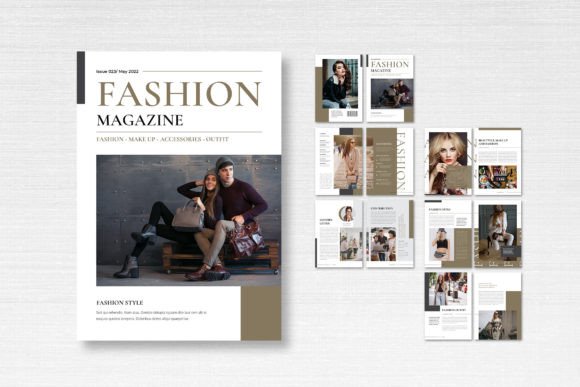
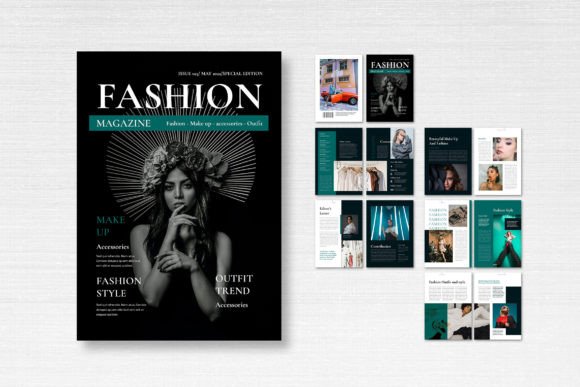
At first glance, this template communicates sophistication. Its design philosophy is rooted in modern editorial design, balancing ample white space with strong typographic hierarchy. The 14 custom pages, including the front and back cover, aren't just random layouts; they're a curated system. You'll find elegant text columns, dynamic image placeholders, and strategic use of pull quotes that guide the reader's eye naturally. The overall aesthetic is clean and contemporary, avoiding fleeting trends for a timeless appeal. It’s a template that doesn’t shout; it speaks with quiet confidence, making it suitable for everything from a luxury fashion lookbook to a minimalist lifestyle journal.
The technical specifications reinforce its professional utility. At 21cm x 29.7cm (A4), it’s a standard size for print and digital distribution. The 300 DPI resolution and CMYK color format are non-negotiables for print-ready files, ensuring your colors reproduce accurately. The included 3mm bleed is a crucial detail many beginners miss, preventing unsightly white edges after trimming. This attention to print-ready standards means the template is built for real-world production, not just on-screen mockups.
Where This Template Truly Shines
The versatility of the Magazine Template – Fashion Style is one of its strongest assets. Its clean, neutral framework acts as a canvas that can adapt to various projects and brand identities.
- Editorial & Publishing: This is its natural habitat. Use it for creating a magazine, book, or journal. The structured layouts help establish a clear visual hierarchy for articles, interviews, and photo spreads, which is essential for editorial design and reader engagement.
- Commercial & Branding: Entrepreneurs and marketers can leverage it for high-end product catalogs, lookbooks, or annual reports. The professional finish enhances brand perception and consistency, communicating reliability and quality to clients and stakeholders.
- Digital & Content Creation: Bloggers and content creators can repurpose the layouts for PDF lead magnets, digital media kits, or styled social media carousels. The strong typographic visual hierarchy translates well to screens, aiding readability and audience engagement.
- Personal & Craft Projects: For hobbyists, it’s perfect for designing a sophisticated family recipe book, a travel memoir, or a portfolio. The ability to fully customize it in InDesign makes it a flexible tool for personal creative expression.
Think of it as a set of professionally designed design assets. You’re not just buying a template; you’re investing in a system that accelerates the creation of polished, consistent publications, freeing you to focus on your content and strategy.
Making the Template Work for Your Project
Downloading the file is just the first step. The real value comes from how you adapt it. Here’s practical guidance for integrating this asset into your workflow.
First, evaluate the fit. Before diving into editing, browse the 14 pages. Do the image aspect ratios suit your photography style? Does the text column width feel comfortable for your typical article length? The template’s strength is its flexibility, but starting with a layout that’s 70% aligned with your vision will save you hours.
Next, customize with intention. The template uses free fonts from DaFont or Google Fonts, which is a massive plus for accessibility and budget. This is your chance to define your font pairing. Use the suggested serif font or sans serif font for body text to ensure readability, and consider a complementary display font or script font for headlines to inject your brand’s personality. The layers are neatly organized, making it straightforward to change colors, swap images, and adjust text blocks without breaking the design’s integrity.
Finally, think beyond the template. The layouts you customize can become the blueprint for your wider brand identity. The style of a pull quote in the magazine could inspire a sidebar in your next blog post. The cover design could inform the aesthetic of your social media graphics. This is how a single template can bring consistency and professionalism across multiple touchpoints, strengthening brand recognition over time.
Remember, the images in the preview are placeholders. Your own photography, illustrations, or curated stock images are what will truly bring the template to life and make it uniquely yours. The template provides the professional skeleton; you provide the soul. For designers, publishers, and creators seeking a reliable, elegant starting point, the Magazine Template – Fashion Style is a practical tool that delivers real-world value, transforming a daunting blank page into a launchpad for polished, impactful work.